


Chicago O'Hare ORD
4.420.00 Reviews
App Specs
- Version
- 26.8.23
- Updated On
- License
- Free
- Downloads
- 10,000+
- Developer
- FlightInfoApps.com
- Categories
- Travel & Local
- Platform
- Android
Screenshots
 Analysis by AppCompare
When I need to check what is happening at Chicago O’Hare without opening a full airline website, Chicago O'Hare ORD is the kind of focused travel app I find easy to understand. It is built around one clear job: helping me follow airport movement through live arrival and departure information, gate details, and delay updates. That narrow purpose is also its biggest strength. I am not asked to sort through hotel offers, destination guides, or a large travel-planning dashboard before reaching the information I actually need.
Published by FlightInfoApps.com, this free Travel & Local app is aimed at people dealing with ORD rather than travelers looking for a universal airport companion. Its current version is 26.8.23, and it runs on Android devices using version 7.0 or later. The app has reached over ten thousand installs and holds a 4.4 average from more than a hundred ratings, which suggests that its straightforward approach has found a useful audience. I see it as a practical utility: most valuable when a flight is already part of my day and I want a quick operational view of the airport.
Live airport information is the whole point
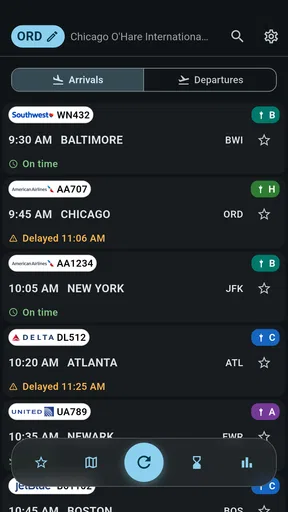
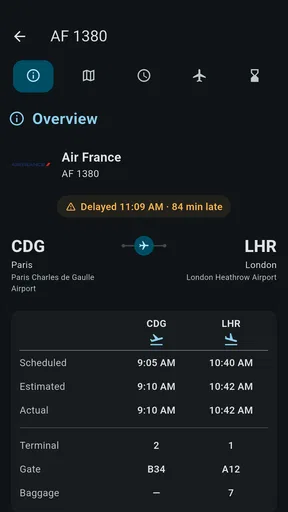
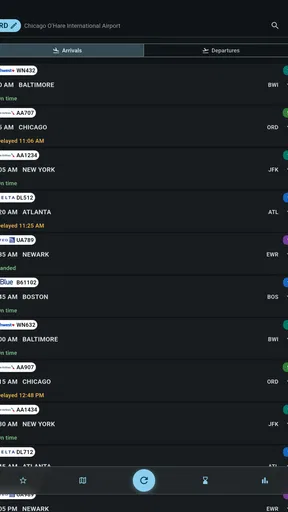
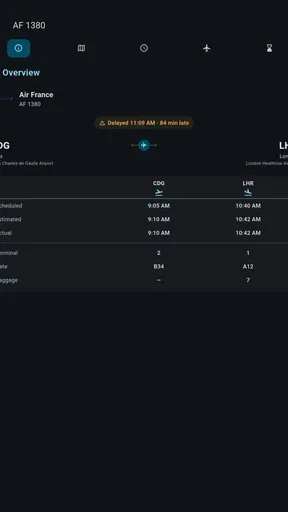
The key capability here is the live view of arrivals, departures, gates, and delays at Chicago O’Hare. In practice, that means the app is less about planning an entire trip and more about answering urgent questions: Has the inbound flight arrived? Is the departure still on schedule? Which gate should I look for? Has a delay changed the timing I was expecting?
That distinction matters because many travel apps try to cover everything. They may combine reservations, loyalty accounts, boarding passes, maps, weather, and airport services. Those tools can be useful, but they can also make a simple status check feel unnecessarily busy. This app makes more sense when I already know the airport and flight context and want an airport-specific screen rather than a general travel organizer.
I would not treat it as a replacement for the airline’s own app or the official information shown at the terminal. Instead, I use it as a convenient extra window into the airport’s activity. The value comes from having the relevant ORD information gathered in one place, especially when I am monitoring a flight that belongs to someone else or when I do not want to sign in to an airline account.
Why the focused design can be useful
A dedicated airport app has an advantage over a broad flight-tracking service: it keeps the location fixed. I do not need to repeatedly select Chicago O’Hare from a worldwide airport list before checking what is happening. That is helpful for residents, frequent visitors, airport workers, and families collecting passengers. Once ORD is the airport I care about, the app’s narrow identity becomes more convenient than a larger service designed for every airport and every kind of trip.
The same focus creates a limitation, though. If my journey includes several airports, a connection in another city, or a detailed itinerary, I would probably prefer an airline app or a general flight tracker. Chicago O'Hare ORD is strongest when the airport itself is the center of the question. It is not the tool I would choose to manage a complicated multi-city schedule.
Worth Reading Before You Choose

Baby Panda World Brings Quick Play to Modern Phones, but Its Game Library Feels Busy

ESPN’s Live Game View Makes Following Close Games Easier

QuizzLand Review: A Good Fit for Short Trivia Breaks, Not Every Player

Basketball Stars: Multiplayer Is Fast, but Can It Recover When Matches Go Wrong?

WEBTOON Turns Phone Updates Into a Better Reading Routine

Link to Windows Runs on Shared Habits, Not Social Feeds
What the information changes in a real trip
Flight status is not just a collection of labels. A delay can change when I leave home, when I meet someone at arrivals, or whether I have time to eat before boarding. A gate update can affect how quickly I need to move through a large airport. An arrival update can save a pickup driver from waiting unnecessarily at the curb. The app’s practical effect is therefore small but meaningful: it can turn a vague wait into a more informed decision.
One detail I appreciate about this type of tool is that it can be useful even when I am not the passenger. Suppose I am collecting a relative from O’Hare during a busy evening. Rather than asking the traveler to keep sending messages while handling luggage and airport navigation, I can monitor the arrival information myself. If the flight is delayed, I can postpone leaving. If the timing remains steady, I can plan the drive with less guesswork. That is a better use case than casually checking an airport out of curiosity.
How I would use it before and during a flight
I would begin by checking the departure or arrival information before leaving for the airport, then use the app again during the journey if plans start to change. The important habit is not to look once and assume the first status will remain unchanged. Airport operations move quickly, and a useful status tool is most valuable when it supports repeated checks at the moments that affect a decision.
For a departing passenger, I would check the flight before setting out, then compare the displayed gate and delay information with the airline’s messages and airport screens after arriving. That second comparison is worthwhile because the app should be treated as a convenience layer, not as permission to ignore official announcements. If the gate changes while I am inside the terminal, the airport’s own signs and staff remain the final practical reference.
For an arriving passenger, I would use the arrival view to estimate when the aircraft is expected to reach the airport, but I would leave extra flexibility for baggage collection, walking, and the time needed to exit the terminal. A flight’s arrival is not the same as the passenger being ready at the pickup point. This is one of the most important ways to avoid overinterpreting a status screen.
A simple workflow for pickups
My preferred workflow would be to check the arrival before driving, check again while waiting for the passenger, and then confirm the gate or terminal information through the airport environment once I am nearby. The app is most useful for deciding whether to start the trip or wait longer; it is less useful as a precise promise about the exact minute someone will appear outside.
This approach also helps reduce needless phone calls. If a relative’s flight is delayed, I can see the change and adjust my departure time. If the flight appears to be progressing normally, I can avoid repeatedly asking for updates. The trade-off is that I still need to allow for traffic, parking, baggage, and curbside restrictions. A live flight status solves only the flight-status part of the pickup problem.
Using gate information without overrelying on it
Gate information is particularly helpful for orientation, but I would use it as a starting point rather than a permanent instruction. Gates can change, and a listing that was useful earlier may no longer reflect the situation by the time I reach the terminal. My practical tip is to glance at the app while planning, then verify the gate on the airport’s displays once inside.
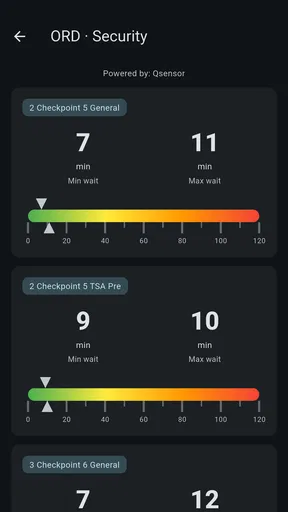
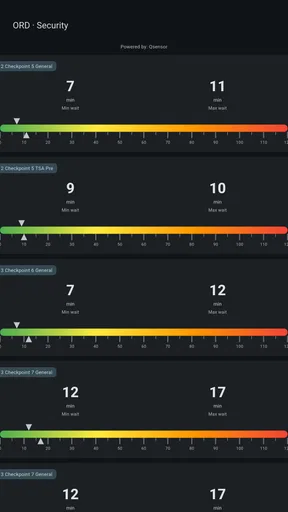
This is also where the app differs from a map or airport-navigation product. A gate number tells me where the flight is expected to operate, but it does not necessarily tell me the fastest walking route, security wait time, or how long the terminal transfer will take. If I need those details, I would pair this app with airport signage or another navigation source rather than expecting a flight-status utility to provide the entire journey.
Checking delays as a decision tool
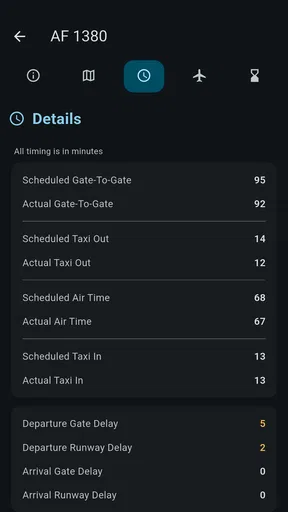
Delay information is most useful when I connect it to an action. A short delay might change when I leave home, while a longer disruption could affect a pickup arrangement or a connection plan. I would avoid treating every delay as final, because schedules can be revised again. The app helps me notice that a decision may need to change; it does not remove the need to keep checking.
For that reason, I would keep airline notifications active when I am the passenger. The airline remains the place where I expect booking-specific communication, while this ORD-focused app is useful for a quick airport view. If I am monitoring someone else’s flight, the app becomes more convenient because I may not have access to the traveler’s reservation details.
The situation where it earns its place
The strongest scenario is a person who regularly travels through Chicago O’Hare or often meets people there. Imagine an evening pickup: I am at home, the traveler is on the aircraft, and traffic makes an early departure inconvenient. I can check the arrival status, wait if the flight is running behind, and leave closer to the useful pickup window. When I arrive, I can use the current gate information as a clue about where the passenger will emerge, while still following airport signs and pickup rules.
That workflow is more valuable than it may first sound. It reduces wasted driving, limits unnecessary messages, and gives a family member or friend a simple way to stay informed without installing the airline’s app. The app is also appropriate for someone who wants to check ORD from a phone without building a complete travel profile or importing every reservation.
Another good scenario is a traveler who has already received a booking confirmation but wants a separate airport-focused check before leaving. The app can serve as a quick second reference for the live airport picture. I would not use it to replace the boarding pass or airline account, but I can see why a traveler would appreciate having a lightweight status view beside those tools.
It may also help a person who works around airport pickups, deliveries, or passenger coordination. The benefit is not that it automates the work; it is that a fixed view of ORD can make repeated checks less cumbersome. Someone who deals with several airports would likely need a broader solution, but a person whose routine centers on O’Hare may prefer this specialization.
When a different app is the better choice
I would skip this app if I mainly want booking management. Travelers who need boarding passes, seat changes, baggage details, loyalty information, or direct airline support will get more from the carrier’s official app. Those features are tied to the reservation, whereas Chicago O'Hare ORD is centered on airport status.
I would also choose a broader flight-tracking service if I regularly follow aircraft across multiple airports or want a single dashboard for an entire itinerary. A general tracker is more suitable for comparing several airports or monitoring flights that have no connection to O’Hare. The focused design that makes this app quick for ORD can feel restrictive outside that setting.
It is not ideal for someone who expects detailed terminal navigation either. Gate information can help me know where to look, but I would still rely on airport signage for walking directions and on official sources for operational instructions. Likewise, a person who rarely visits Chicago may not gain enough from installing an airport-specific tool unless they are tracking a particular arrival or departure.
The trade-offs behind a free airport utility
The app is free to install, which makes trying it low-risk for an occasional O’Hare trip. It is marked for mature users aged seventeen and over, and optional in-app purchases range from around three dollars to around thirty-three dollars per item. I would pay attention to the purchase prompts and decide whether the free experience already covers my needs before spending anything. For a simple status check, the basic value proposition is easy to understand; extra spending only makes sense if it adds something I personally use often.
Its age classification may also influence who installs it on a shared family device, although the app’s subject is ordinary travel information. Parents arranging a pickup should still consider the store’s mature rating when deciding whether it belongs on a child’s device. For adult travelers and drivers, the rating is less likely to affect the practical use of the app.
The developer, FlightInfoApps.com, has kept the product identity tightly connected to one airport. That specialization is reassuring when my question is specifically about ORD, but it also means I should not expect the flexibility of a large travel platform. I see this as a deliberate trade-off: less breadth in exchange for a more direct airport-centered experience.
Accuracy, timing, and the need for a second check
The word “live” can encourage unrealistic expectations. Even when a status is updated promptly, airport conditions can change between checks. A gate may move, a delay may be adjusted, or an arriving traveler may need more time after landing. I would use the app to make better decisions, not to make decisions with no margin for error.
My rule would be simple: use the app for awareness, then confirm critical changes through the airline, airport screens, or staff. This is especially important before boarding, during a tight connection, or when driving to meet a passenger at a specific time. The app’s strength is convenience, while official channels remain more appropriate for instructions tied directly to my booking or airport movement.
That limitation does not make the app weak. It defines its role. A weather app can tell me that rain is expected, but I still look outside before leaving; similarly, a flight-status app can show the latest airport picture, but I still allow time for the parts of travel it cannot control. Users who understand that boundary are likely to get more value from it.
Who benefits most from this focused ORD view
I think the best audience is made up of frequent O’Hare travelers, local residents, airport pickup drivers, and relatives tracking someone’s arrival. These users have a repeated reason to check the same airport, so the app’s specialization works in their favor. They do not need a global travel suite every time they want to know whether a flight is delayed or where it is expected to operate.
Occasional travelers can benefit too, particularly when a trip involves meeting someone or making a time-sensitive departure decision. Because it is free to install, it is reasonable to try it before an O’Hare trip and see whether its focused information fits the way I travel. I would still keep the airline’s app or confirmation available for booking-specific details.
The audience is smaller for people who never use Chicago O’Hare, who need international itinerary management, or who want detailed airport maps and terminal services. Those users would probably be better served by an airline app, a broad flight tracker, or an airport navigation tool. Installing this one only makes sense when ORD is a meaningful part of the travel problem.
Its rating of 4.4 from more than a hundred ratings shows a generally positive reception, while the app’s install base of over ten thousand indicates that it is a niche utility rather than a universal travel platform. I would interpret that positively but realistically: it appears to satisfy people looking for this particular airport view, not necessarily every kind of traveler.
My final take after using it as a travel companion
Chicago O'Hare ORD succeeds because it does not try to turn an airport status check into a complete travel-management system. Its live attention to arrivals, departures, gates, and delays gives me a practical way to follow activity at O’Hare, especially when I am coordinating a pickup or deciding when to leave for the terminal.
The best way to use it is alongside, not instead of, official airline and airport information. I would check it before setting out, use it to spot delays or likely gate details, and then verify important changes through airport screens or the carrier. That workflow respects both its convenience and its limits.
My recommendation is clear: choose it if Chicago O’Hare is a regular part of your life and you want a focused live-status tool. If your needs extend to reservations, boarding passes, several airports, or detailed terminal navigation, another app will be a better center for your travel routine. For ORD-specific awareness, though, this free utility has a sensible purpose and can make ordinary airport decisions noticeably less stressful.
Pros
- Live flight updates help track arrivals
- departures
- delays
- and gate changes.
- Terminal maps make it easier to find gates
- baggage claim
- and airport facilities.
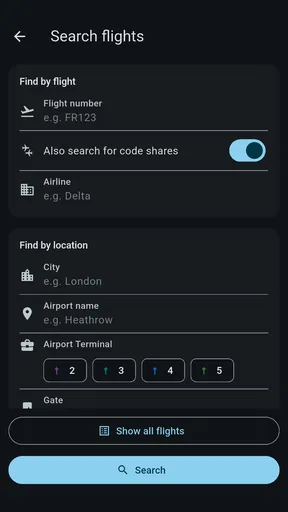
- Search tools provide useful airline
- flight number
- and destination information.
- Helpful details about parking
- ground transportation
- and airport services.
- Useful for checking airport information before leaving for O’Hare.
Cons
- Information may change quickly
- so important details should be verified at the airport.
- Some features may depend on an active internet connection.
- Large airport layouts can still feel confusing for first-time visitors.
- Flight information may occasionally lag behind airline announcements.
- Users may need separate apps for mobile boarding passes or airline-specific services.
FAQs for Chicago O'Hare ORD
What is Chicago O’Hare ORD, and what can the app be used for?
Chicago O’Hare ORD is designed to help travelers manage and understand their journey through Chicago O’Hare International Airport. It can provide useful airport information such as terminal details, airline locations, flight-related updates, maps, transportation options, parking information, and available services. It is especially helpful for passengers who want to plan ahead or find their way around one of the busiest airports in the United States.
Does Chicago O’Hare ORD provide real-time flight information?
The app may offer flight-related details such as scheduled arrival and departure times, terminal or gate information, delays, cancellations, and status updates. However, travelers should remember that airport conditions can change quickly. For the most accurate information, it is recommended to compare the app’s details with updates from the airline, airport announcements, and official airport screens, particularly during severe weather or operational disruptions.
Can I use Chicago O’Hare ORD to find terminals, gates, and airport services?
Yes, the app is intended to make navigating O’Hare easier by helping users identify terminals, gates, baggage claim areas, restrooms, lounges, restaurants, shops, information desks, and other facilities. Its maps and location tools can be useful when changing terminals or searching for a specific service. Because walking times can vary, passengers should still allow extra time between connections.
Does the app include transportation, parking, or pickup information for O’Hare Airport?
Chicago O’Hare ORD can be useful for travelers looking for information about getting to and from the airport. Depending on the available features, this may include parking areas, rental cars, taxis, rideshare pickup zones, public transportation, airport shuttles, and passenger pickup guidance. Rules and pickup locations may change, so checking current airport instructions before traveling is recommended.
Is Chicago O’Hare ORD free to download, and does it require an internet connection?
The app may be available to download without an upfront charge, although some features could depend on the platform, region, or future updates. An internet connection is generally recommended for current flight information, maps, alerts, and transportation details. Some previously loaded content may remain accessible offline, but travelers should not rely on offline access for live updates or last-minute changes.


